Laravel Nova: Setup, Integration & Best Use Cases
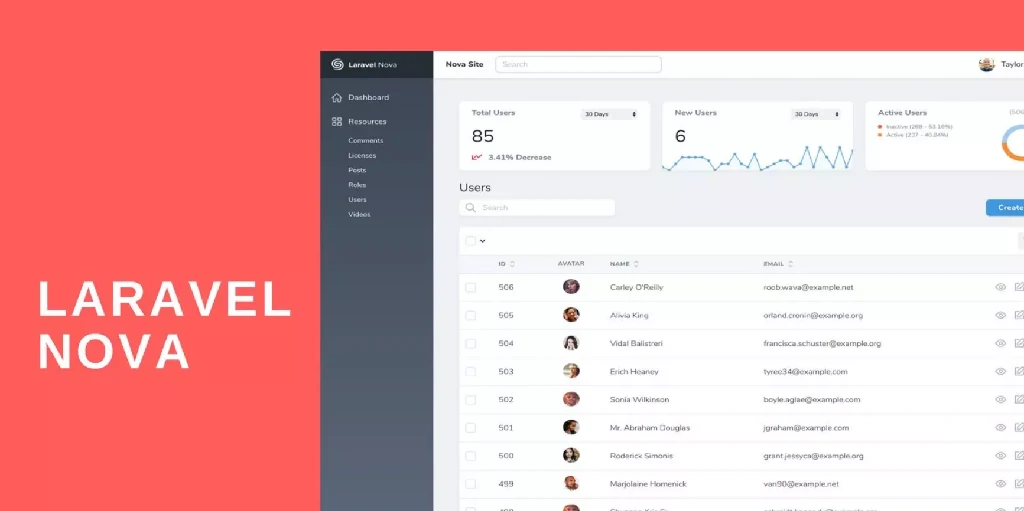
Laravel Nova is a powerful admin panel that saves dev time. In this guide, learn how to install Nova, use it, and know when it’s the right tool for your Laravel project.
⚙️ What Is Laravel Nova?
Laravel Nova is an official Laravel admin panel package.
It gives you a beautiful UI to manage your Eloquent models — without writing your own dashboard from scratch.
Think of it like:
- A Laravel-flavored CMS
- A back-office tool for managing users, posts, orders, etc.
- A data admin layer for your clients or internal team
📦 How to Install Laravel Nova

Nova is **not free**. It’s a paid product from Laravel (https://nova.laravel.com).

Once purchased, you’ll get access to a private Nova repository.

Steps:
1. Add your Nova repo credentials to your 'auth.json' or 'composer config':
   ```bash
   composer config repositories.nova composer https://nova.laravel.com
   composer config --global --auth http-basic.nova.laravel.com your-email your-license-key
   ```

2. Require Nova:
   ```bash
   composer require laravel/nova
   ```

3. Publish assets and migrate:
   ```bash
   php artisan nova:install
   php artisan migrate
   ```

4. Create your first Nova resource:
   ```bash
   php artisan nova:resource User
   ```

That’s it. You’ll now see '/nova' in your browser.
🔁 How to Add Nova to an Existing Project

Nova works great in both new and old Laravel apps.

If your project already has Eloquent models, just generate the resources:

Example:
```bash
php artisan nova:resource Product
php artisan nova:resource Order
This creates files like app/Nova/Product.php, where you can define fields, filters, cards, and actions.
You can customize:
- Fields: Text, Boolean, File, Image, etc.
- Relationships: BelongsTo, HasMany, MorphMany, etc.
- Metrics: Like number of new users this week
- Actions: Like “Approve Order” or “Mark as Shipped”
🎯 When Should You Use Laravel Nova?
Nova shines when:
- You want a quick admin dashboard for CRUD
- You’re building internal tools or client portals
- You don’t want to maintain your own admin UI
- You’re already deep into Laravel and want a native experience
Avoid Nova if:
- You need heavy customization in the UI/UX
- You want a free/open source alternative (look into Filament or Voyager)
🔐 Securing Nova Access
Out of the box, Nova is restricted to users who pass the Gate::allows('viewNova') check.
To control access:
- Open
app/Providers/NovaServiceProvider.php - Modify the gate logic:
Gate::define('viewNova', function ($user) {
    return $user->is_admin;
});
Now only admin users can access '/nova'.
🧩 Nova Custom Fields & Tools
Nova lets you extend it via:
- Custom fields (e.g., Color Picker, Markdown Editor)
- Custom cards (e.g., Metrics)
- Custom tools (e.g., whole Vue components)
Install community packages or build your own:
php artisan nova:field StatusToggle
php artisan nova:tool CustomAnalytics
It uses Vue under the hood, so frontend extensions are flexible.
🗂 Example Use Cases
Here’s where Nova works best:
- CRM panels
- Inventory dashboards
- Blog/article admin
- User management (for SaaS)
- Order processing panel
For client work, it’s a good way to hand over admin tools fast without building a custom backend.
📌 Pros vs Cons
✅ Pros:
- Built by Laravel team
- Native Laravel experience
- Beautiful UI
- Great for CRUD + metrics
❌ Cons:
- Paid (starts at $99)
- UI is less customizable than Filament
- Not ideal for frontend-heavy admin panels
🚀 Final Tip
Nova isn’t just for big enterprise dashboards. It’s great for small internal tools too.
Start with a few resources, build actions, metrics, and filters — and you’ve got a full admin suite in days, not weeks.
Need a Filament vs Nova comparison?
Want help building custom Nova tools?
Check out more practical Laravel tips on the blog:
https://mostefa-boudjema.vercel.app/blog
Related Posts

Laravel Filament: Powerful Admin Panels Made Easy

Laravel Pulse vs Telescope: Best Monitoring Tool for Production
Eager vs Lazy Loading in Laravel (Clear, Practical Guide)
Laravel Service Container vs Service Provider: What’s the Difference?
What Is the Advantage of DTO (Over Model Instances)?