Laravel Multi-Tenancy: How to Get Started and When to Use It
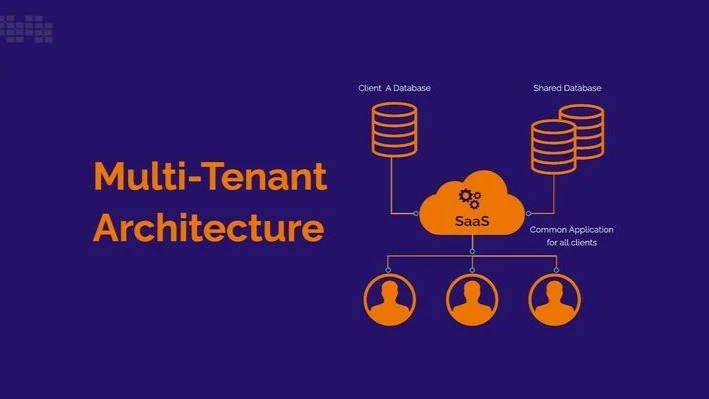
Thinking about building a SaaS or client-facing app with isolated data? Laravel multi-tenancy is what you’re looking for. This guide walks you through setup, strategy, and best use cases.
🏢 What Is Multi-Tenancy?
Multi-tenancy means a single app serves multiple clients (tenants) with isolated data.
Example:
- A SaaS CRM where each company has its own users, leads, and data.
- A real estate system where each agency has separate listings.
🧠 Multi-Tenancy Types in Laravel

There are 3 main strategies:

1. **Single Database – Shared Schema**
   All tenants use the same DB and tables, identified by a `tenant_id` field.

2. **Single Database – Separate Schemas**
   One DB, but each tenant has their own schema (PostgreSQL only).

3. **Multiple Databases**
   Each tenant has their own database. Best for strong isolation and scaling.

Pick based on:
- # of tenants
- Data isolation/security needs
- App complexity
🔧 Getting Started with Laravel Tenancy

Use [stancl/tenancy](https://tenancyforlaravel.com) — it’s the most popular and well-documented package for Laravel multi-tenancy.

Installation:

```bash
composer require stancl/tenancy
php artisan tenancy:install
php artisan migrate
This package supports:
- Multiple DBs per tenant
- Central and tenant-specific routes
- Tenant-aware queues, events, jobs, and storage
---
📁 Folder Structure Tips
Your app will have:
- Central app: authentication, tenant creation, billing, etc.
- Tenant app: the actual business logic (dashboard, resources, etc.)
Stancl keeps the structure simple:
routes/tenant.php– for tenant-specific routesroutes/web.php– for central app- Tenants auto-resolve based on domain or subdomain
---
🌐 Route Handling (Central vs Tenant)
Stancl automatically detects the tenant using domains or subdomains.
Example:
yourapp.com→ Centralclient1.yourapp.com→ Tenant 1client2.yourapp.com→ Tenant 2
Tenant routes go inside:
// routes/tenant.php
Route::middleware(['web', 'tenant'])->group(function () {
    Route::get('/dashboard', function () {
        return 'Tenant dashboard';
    });
});
---
🗃 Database Per Tenant (Best Isolation)
This is the default and safest setup.
Every tenant gets its own DB, which is created automatically:
Tenant::create([
  'id' => 'client1',
  'domain' => 'client1.yourapp.com',
]);
You define what migrations run for tenants:
php artisan tenants:migrate
You can even seed data per tenant.
---
⚙️ Useful Stancl Commands
php artisan tenants:createphp artisan tenants:listphp artisan tenants:migratephp artisan tenants:seed
You can also dispatch jobs or queue events tenant-by-tenant.
---
📦 When Should You Use Multi-Tenancy?
Use multi-tenancy if:
- You’re building a SaaS
- You need data separation between clients
- You want clients to have their own subdomain
- You need to scale easily by moving tenants across DB servers
Don’t use multi-tenancy if:
- You’re building a simple one-client app
- Your app only has different user roles (admin/user) — that’s not tenancy
---
⚠️ Challenges to Keep in Mind
- Backups: each tenant DB needs its own backup routine
- Migrations: test carefully before running tenant-wide
- Caching: isolate tenant cache to avoid data leaks
- Debugging: more moving parts = more complexity
---
🌟 Final Tip
Start simple — one DB per tenant is usually enough.
Use stancl/tenancy for Laravel, and only introduce custom logic if you really need it.
Need a starter template for Laravel SaaS with tenancy?
Want tips on user billing + tenant creation?
Check out more Laravel SaaS tips on the blog:
https://mostefa-boudjema.vercel.app/blog
Related Posts
What Is the Advantage of DTO (Over Model Instances)?
Laravel Service Container vs Service Provider: What’s the Difference?

Laravel Filament: Powerful Admin Panels Made Easy
Laravel Nova: Setup, Integration & Best Use Cases

Laravel Pulse vs Telescope: Best Monitoring Tool for Production